
Early Access Releases
Early Access versions are test releases that have been through internal testing, and are now ready for a short period of public testing before official release.
In other words, we want you to try out all the cool new features and let us know what you think!
Select an option to learn more.
All the latest and greatest LightBurn features have made it out of Early Access and into the official release! Download here →
All the latest and greatest MillMage features have made it out of Early Access and into the official release! Download here →
Standard licensing rules apply. Learn more →
Install Side-by-Side
Early Access releases install alongside the official release on your computer — no preferences are changed, and nothing is overwritten.
If you run into a show-stopping bug, you can switch back to the official install in minutes and keep working.
Learn more →Use With Care
Early Access releases are generally very stable, but be sure to save frequently and be mindful of the potential for unexpected results.
If you've got a big job you need to get out the door fast, now is not the best time to try out an Early Access release.
Report Bugs
If you encounter a bug, please let us know what went wrong and how to reproduce it, so we can fix it before the official release goes out.
We're also happy to hear general feedback on our changes — let us know what you think we can improve.
Learn more →Before You Start
Standard licensing rules apply — you'll need a current license key or active trial to run an Early Access release.
Some new features require a Pro license. If you have a Core license and want to try them, go to Help → License Management and click Trial Pro to get two weeks of Pro access. Learn more about licensing →
Installing Alongside Your Current Version
Early Access builds install separately from your official release, so both stay available, and no settings are overwritten.
On Windows, they install to a directory with a _PreRelease suffix by default, and appear in your Start Menu with (PreRelease) after the name.
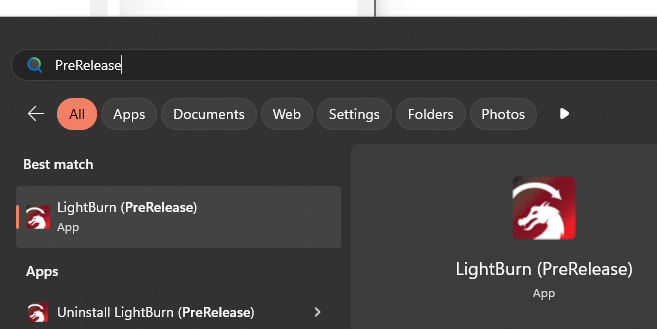
On Mac, the app has the _PreRelease suffix added to its name.

Preferences are stored separately too, in a directory with the same _PreRelease suffix. The first time you run a pre-release version you'll be prompted to import your preferences from the official install.
You can also use User Bundles later on to transfer settings from your official install to your pre-release one.
Writing a Useful Bug Report
Please include as much detail as you can about what you were doing when the problem happened, so we can reproduce it.
We need:
- The version number of the build (shown in the topbar of the software)
- Your operating system and version number
- The exact model of your machine, and its controller/firmware
- A step-by-step explanation of the actions leading to the bug
- Screenshots or short video of the bug
- The project file you were working with, or an example file if the issue isn't tied to a specific project
Email Support@LightBurnSoftware.com, or post in the latest Release Candidate thread on our forum.
Email Support@MillMageSoftware.com, or post in MillMage Software Questions on our forum. For hardware compatibility issues, use MillMage Hardware Compatibility.