
We're thrilled to announce that MillMage Pro has arrived, and it's packed with new, highly in-demand features like V-Carving, Relief Carving, and True Nesting.
Download Here Buy MillMage Pro Upgrade From Core to Pro
We've worked day and night to get this one ready — which is actually not that hard for us, since we have team members in nearly every Earthly timezone. But we digress. More precisely, MillMage 0.9.00 is here, and, more precisely still, it's got lots of new tools available to both Pro and Core users, including Centerline Trace, Multi Page projects, and more!
With 0.9, we now have all the key tools that most CNC users need for their day-to-day work — and then some. We're not done yet, and we'll be working to expand the MillMage toolkit even more based on your feedback. It's all part of our quest to bring the LightBurn model to the world of CNC routing: design-to-send digifab software that's powerful, speedy, and stable; offered at a fair price and under a perpetual licensing model.
New users can try MillMage free for 30 days, Pro features and all, with no watermarks and no restrictions (except the usual things covered in our EULA, like "you can't do something dumb with your machine and then blame us for it").
If you've already got a Core license, you can upgrade to Pro for $100 USD. To try out the new features before upgrading, head to Help → License Management and click the Trial Pro button to get access to all Pro features for two weeks.
Read on for more information on all the new features!
V-Carving (Pro-Only)
V-Carving is now available — need we say more? Probably not, but we will anyway.
Commonly used for sign making, decorative engraving, and object personalization, V-Carving is a method of dynamically adjusting the height of an angled V-Bit to perform variable-width carvings with precise details that you can't achieve with a standard end mill.
We're especially proud of the speed of our implementation — even with complex designs, MillMage can generate your toolpaths in seconds, then you're ready to send.

3D Relief Carving (Pro-Only)
Relief Carving utilizes a grayscale depth map to carve a three dimensional object into your material, varying depth based on shades of gray in the source image.
We've added not one but two 3D Relief Carving operations — Roughing and Finishing. Set up your Roughing pass to clear out the bulk of the material quickly, then use a Finishing pass to carve the fine details.
As with V-Carving we've built Relief Carving for speed — our toolpath computation is lightning fast, and we've optimized the paths themselves to save you carving time.

3D Model Import (Pro-Only)
But where to get your depth maps? There are plenty of options for sourcing depth map images directly, but if all you have handy is an STL, we've built a solution directly into MillMage.
Go to File → Import or drag and drop your .STL, .3MF, .OBJ, or other supported file* directly into your Workspace, then adjust its orientation and other parameters, and convert it to a grayscale image ready for Relief Carving.

*We currently support .3mf, .amf, .obj, .off, .ply, and .stl file types.
Texturing (Pro-Only)
Our final new operation in 0.9 is Texturing, a great way to add a bit of extra flair to your creative projects.
Texturing carves patterns into your material at varying depths. You can control the type, depth, length, and angle of the carving, among many other options.

True Nesting (Pro-Only)
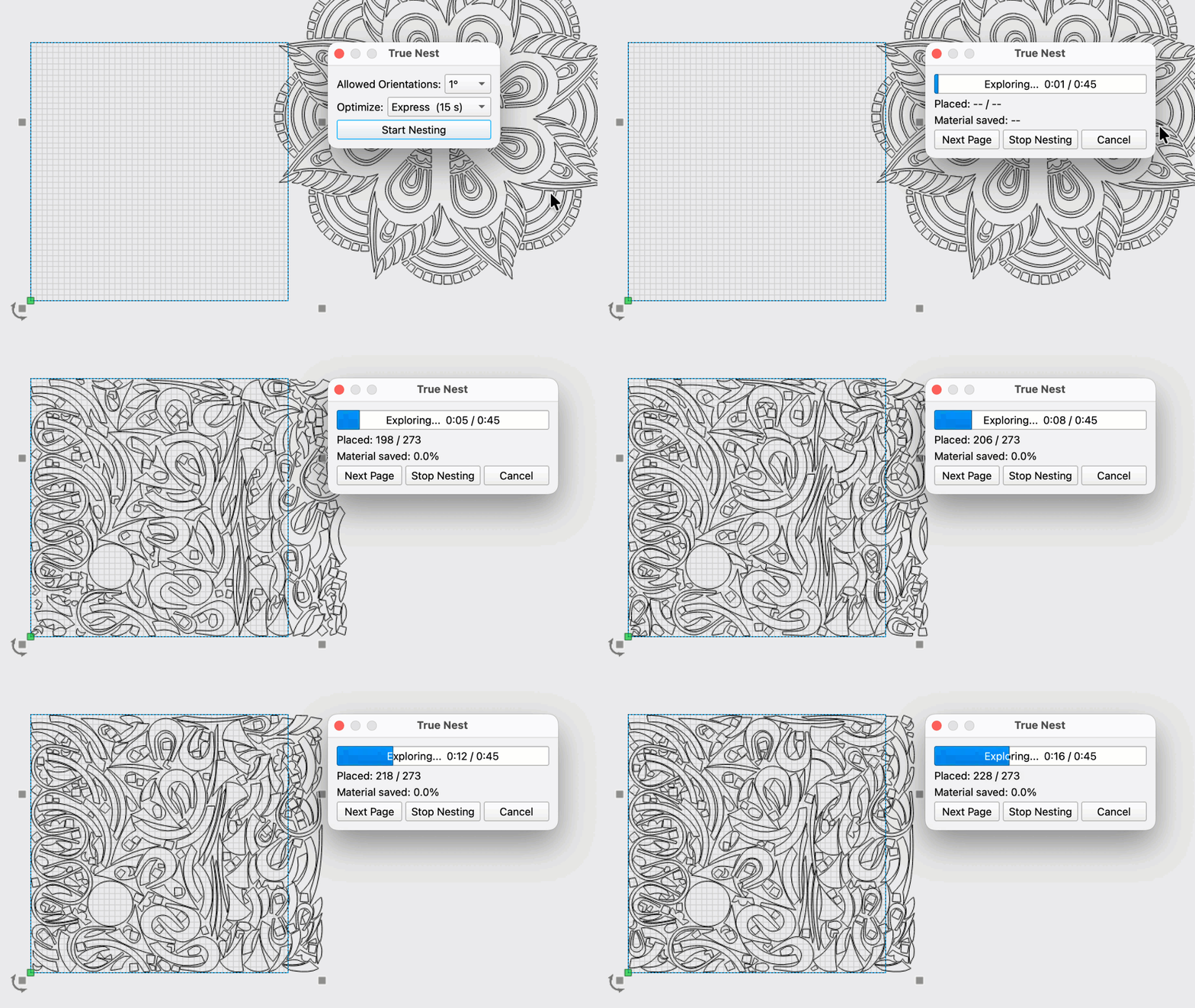
Laying out graphics for maximum efficiency results in huge savings in both job runtime and material costs — it's also just plain satisfying. With nesting, MillMage automatically arranges objects for you.
We implemented Quick Nest in our initial release — it's blazing fast, but only nests objects based on their bounding boxes. True Nest goes a step further, arranging objects not by their bounding boxes but by their actual contours, resulting in much more efficient layouts.
You can choose from four different optimization levels that control how long MillMage will spend calculating the most efficient layout. The less patient among us can choose to stop the calculation and use the current layout at any point in the process.
Centerline Trace
Rather than tracing the outlines of an image, Centerline Trace produces single lines running along the medial axis of traced shapes. It's great for logos, text, or sketches, and is especially valuable for generating vector graphics usable with a CNC router.
To use it, right-click an image in your Workspace and select Trace Image, then toggle on the Centerline Trace switch.

Multi Page
We now support projects with multiple pages. You can create, select, re-name, delete, duplicate, and adjust settings for pages using the controls at the top of your Workspace, or in the new Pages Window.

Trochoidal Pocketing (Pro Only)
We've added support for Trochoidal paths for Pocket operations. Similar to our initial implementation of Trochoidal Profiles, Trochoidal Pocketing works by creating a path of circular cuts, resulting in reduced radial engagement and lower stress on both tool and machine. The reduced stress of the trochoidal path enables better chip evacuation and allows for deeper depths of cut.
This process enables users with low stiffness/power CNCs to machine materials they might not otherwise be able to, and those with stiff/powerful CNCs to machine much more efficiently.
Maker Studio Integration
Our first entry in the MillMage Web Tools Menu is here — meet Maker Studio (or say "nice to see you again" if you were already familiar with it outside of MillMage).
Maker Studio's 3D Map generator lets you select a location on a map and turn it into a topographic relief carving. Choose your region and click Export — the generated model will open automatically in MillMage, where you can convert it to a grayscale image.
As with our previous integration of Cuttle into the LightBurn Web Tools menu, Maker Studio offers both free and paid tiers. If you choose to subscribe to a paid plan, we do not take a cut. We add sites to our Web Tools Menu solely so we can introduce valuable outside tools to our users, and streamline the workflow from their site to our software.
Other Notable Additions
- MillMage can now directly connect to and control CNC routers with Duet controllers over HTTP.
- Click the View Paths button in the Job Control Window to see the toolpaths MillMage will generate and send to your machine overlayed in your Workspace.
Changelog
Click to Read our Full Changelog
New Features
- Added True Nest
- Added Center Line Trace
- Added Web Tools
- Added 3D Model shape object and 3D model import
- Added depth map creation from imported 3D models.
- Show Custom GCode Flavor in Device List
- Marlin 2.1 support in MillMage
- Support for Duet / RepRap GCode Flavor
- Added target buffer override for gcode devices in case the firmware doesn't or incorrectly reports the buffer size.
- Added filtering for FluidNC flavor to clean [MSG] spam in the Console
- New Duet/RRF HTTP flavor for Custom GCode
- Added default gcode file extensions for custom gcode flavors
User Interface Updates
- New Warning icon added with better contrast at smaller sizes.
- Tab key now changes focus on Tool Library notes text input instead of indenting.
- Tool Library Feeds and Speeds layout rows now have uniform heights.
- Created outlined labs icon with white border for visibility on dark device logos
- Added checks to ensure the Tool Library dialog window is not drawn outside the screen boundaries.
- Improved visibility of toolbar drag handles and overflow arrows.
- Added padding between items in the main toolbar.
- Changed layout of probe settings dialog from portrait to landscape so it will fit correctly on smaller displays.
- Changed style of buttons in 3D import and depth map settings dialog to better show when a button has focus.
Existing Feature Updates
- Start point drawing improvement
- Map3D faster rendering
- Made 'Units' toggle clearer
- More optimal raster pocket traversal
- Added Relief operation
- Cached operation outputs - much faster cut build / preview cycle
- Better partial redraw logic for preview/sim
- Added new controllers to drop down menu, with updated gcode defaults as a result.
- Added project out of bounds checks to account for being over the machine limits with the project depending on the coordinate offsets.
- Control Mode drawing improvements
- Created a dialog to edit Workpiece Origin Coordinates from the Move Widget
- Allow read of simulation values for custom gcode machines if they are GRBL flavor.
- Cleanup code for improper use of CutBuilder Pointer in the static sim widget
- Improvement to Operations View to show warnings and errors and hint info.
- Added tool drawing to 3d preview
- Improved preview interaction rate
- Optimized Fluting paths
- Added stress cutting operation to better appreciate relief carving
- Improved depth sim speed for tapered bits
- Allow Cut Settings values Start Depth and Final Depth to be entered and kept as a percentage instead of in specific units.
- Changed the Light Mode, Preview Travel Move - Line Color to the same blue as in Dark mode to be more consistent and different from Cut moves.
- Select when pasting from other apps
- Change Framing to handle Tool Offsets for Framing according to Cut Type Used and added ability to frame selected shapes.
- Save & restore Undo History position & size
- Changed QNumEntry to allow comma or dot for the decimal place and ignore previous commas and dots, show thousands separator as thin space.
- Show 'Cmd/Ctrl-Arrow:' instead of 'Ctrl-Arrow:' in settings to indicate Mac command.
- Filter path & weird chars out of the document title in exported AI files
- Save simulation quality setting with project
- For V-carve, if startDepth is not zero, drop slower
- Increase the font preview limit to 4000 fonts, speed be damned
- Control Mode, added GCode search options and jump to start of Operation in the right click menu of the GCode List.
- Allow cut, copy and paste of CNC Operations in the Ops Panel
- Updated to latest VC Redist and removed unneeded version from installer
- Break apart and Auto-join now preserve tabs
- Improved error message when running Preview or Control Mode or job, and there is nothing to output.
- Stand up and spin 3 times then sit down to enable chair monitor calibration
- Added custom shortcut keys for user defined macros.
- Don't validate numeric fields on each typed character
- Added app version number to prefs
- Changed the Export GCode "Tool" column to use the tool's Display Name instead of diameter/type
- Double-click in node edit to convert to path
- Highlight the current preview texture
- Improved theme so selected items and progress bars retain part of their original blue color instead of turning white for light theme and black for dark theme.
- Warp and Deform weren't retaining bitmap properties
- Improved path generation of large-stepover 'missing regions' pass
- More optimal v-carve output ordering
- New Device Wizard shows a message that user does not need to edit comms settings except when resolving problems
- Added Z Block probe type to probe wizard
- Ensure consistent G-code in messages and gui, capitalize Error: in console.
- If user runs probe wizard after run start, show a warning before starting the job to remove the probe and wires.
- New comm status of Not Responding so error message can distinguish between disconnected and not responding.
- Changes to License dialog to be more clear and have links to web pages for help
- Auto un-cache pro op errors
- Auto-exclude bitmaps from pocket operations
- Only change active device on project load, not on Page Change.
- Closing the tool library window now saves pending changes; the Cancel button still discards them.
- When no compatible tool exists the operation editor shows an empty tool setup and disables OK until a tool is selected.
- Added better multi mesh support for 3D Import and depth map conversion.
Bug Fixes
- New project with no devices would crash
- Choosing the SAME texture shouldn't modify the project
- Fixed to allow Ctrl-Q to close MM even when in Control Mode.
- Prevent "Missing GCode For selected settings" warning in Device Settings dialog when inherited placeholder is valid
- Fixed confusing Troubleshooting Dialog by formatting all messages as simply as possible
- Machine size warning was backwards
- Chamfer wasn't properly using start/final depth values
- Ops without shapes would get assigned to shape 0
- Add space after emitting G53
- Fixed an issue where homing would occasionally take the scenic route
- Handle malformed xml data better and report more issues without crashing when loading a damaged or incorrect file.
- Fixed the machine boundary calculations for the project out of bounds warning.
- Fixed the Tool and GCode cursor positions when device units are in inches.
- Some escaped characters were causing strings to visually repeat in the console log
- New Device Wizard should reset Dwell when a new Flavor is chosen
- Remove unnecessary M9 coolant off command at end of jobs
- GRBL M3 Flavor jog panel got broken when switching from another Flavor that had continuous jog
- FluidNC support was missing some connections
- Updated GRBL-STM GCode Flavor to enable continuous jog and probing
- SVG with OffsetFill didn't export correctly
- Cleaned up duplicated mode & Z outputs
- Zero Axis buttons were incorrectly greyed out for some protocol flavors
- Fluting Start Point wasn't respected
- Fixed texture spelling
- Suppress Operations Export ATC warning when only one tool in use
- Deform tool issues with grouped base shapes
- Fixed an issue where Undo did not restore removed material. Closed as hardware limitation.
- Limit ramp angle to 1 to 89 degrees
- Custom gcode rotary diameter setting was never emitted
- Don't escape tab characters in the console log
- Fixed failure to read xml file if ANY unexpected key exists in the file, and key name case mismatch for tool VendorURL and Notes.
- Custom GCode was double-scaling imperial position queries when $13=1
- Ungrouping an array with mirrored objects loses the mirror transform.
- Un-grouping native shapes after mirror transform caused flip
- Removing tiny prims could cause open shapes
- Fixed error with drill tip measurement
- Added unit modal to the beginning of the probe commands during the wizard.
- Add/remove shapes in an op didn't work with grouped shapes
- Texture op didn't work with Z-Bottom origin
- Custom GCode
CanZeroAxiswas not always returning a value for less used flavors - Unprintable escaped characters in Custom GCode example blocks were appending odd HTML characters
- Rest Pocket could fail on very tight tolerance areas
- Tab changes didn't clear op cache
- Fixed start depth & top/bottom for relief
- Don't set file type association in pre-release mode
- Fixed typos in Quick Nest messages
- Fixed potential memory leak when validating custom gcode settings.
- Don't intercept the numpad while edits are active
- Fixed loading units when coming from older versions
- ZigZag ramp didn't work for vcarve with start depth != 0
- Closed shapes could become open during tiny line removal if the line connected to the first node in a shape
- Select Results option on Copy Along Path would crash
- A change to SpatialPrimQuery for cut optimizer broke ramp fill
- Output toggles were changing when outputting gcode
- Ungrouping text that was bent distorts or loses the bend
- Check for last control units was using the wrong parameter
- Fixed issue with automatically enabling tabs on add
- Ensure web files are always loaded
- Show correct offset table when reading scanning offsets
- Fixed MessageBox display of Rich Text vs Regular Text messages.
- Fixed title casing in probe configuration
- Some Custom Gcode values were getting unit conversions when they shouldn't
- Removed SSL certificate generation and usage for the API to be HTTPS
- Exporting to SVG could crash with inner shapes that had no operation
- Launching and immediately closing could cause a crash in the webtool loader
- Make virtual keyboard show when using tablet and touching a spin box or custom num editor (Windows only)
- Changing device (even on startup) set modified flag
- Medial offsetter should make closed shapes
- Fixed Bitmaps with invalid XFORM causing crashes and problems loading and in UI
- Bitmap relief transform was incorrect if grouped
- Fixed title casing in require control mode toggle
- Virtual array caused problems with cached ops
- Stale pointer could cause crash when switching units
- Cached operation errors prevented op from rebuilding
- Cached tool info not updated on tool change
- Fixed issue causing viewport of 3D import dialog not rendering.
- Tell QSerialPort not to restore the pre-open DCB on close so closing the port no longer reverts DTR back to its pre-open default, which was resetting Arduino-class controllers on disconnect.
- Further hardening against race condition crash
- Fixed typo in depth map converter
- WebTools was only generating a timestamped URL once at start
- Fixed the Buy MillMage button wrongly displaying "Buy LightBurn" on first start.
- Medial offset missed some segments
- Min tabs was not always being respected
- Apply Mask allowed reusing a shape already applied as a mask
- Engrave Acceleration Z in Additional Device Settings was being read from the controller as incorrect units
- Default tool def should be marked as a project tool
- Fixed numeric entry equation parsing issue with comma vs period
- Probe definition dialog had different input limits than probe execute.
- Probing allowed 0 value for XYZ search distance. Changed to sensible minimum.
- Prevent probing from trying to continue sequence if failure occurred.
- Updated dogbone tool to use double-precision math to reduce failure cases
- Keep edited workpiece dimensions when switching device profiles in the project wizard.
- Handle new text width properly after a copy paste to prevent font position changes.
- Renderbuffer being rebuilt constantly due to incorrect comparison.
- Coordinate pocketing parameters in UI
- Fixed double jpg extension on export
- Fixed title case across all entries in the right click menus.
- Fixed framing bounds computation to be more accurate to selected outputs.
- Bad slot virtuals caused some update functions to not be called in the operations UI
- Fixed trim tool not working for some cases.
- Select all shapes for an operation accidentally included shapes from other pages.
- Relief roughing / finishing issues
- Toggle Panel visibility was missing toggling the Pages panel.
- Pocket lift retracts were checking the wrong bounds
- Final offset pass bug
- Fixed issue causing all library tools to be treated as project tools, preventing tool deletion and certain modifications.
- Roughing shapes with holes that contained other shapes could repeat some areas
- Solve error generating shapes after deleting shapes or pages.
- Fixed issue causing device settings dialog to cutoff custom gcode options.
- Removed limit 50% maximum from stepover in tool library.
- Fixed a bug causing the preview window texture tooltip to display the same image for all textures.
- Initial 3D relief plunge with Z-bottom bug
- For all cut types warn in the GUI if startDepth is below the stock depth. For Texturing warn in GUI and if generated cut is below the stock depth.
- Fixed inability to enter start or final depth percentage above 12% when units in inches
- Fixed Sync Views toggle to save state
- Fixed issue where framing could use the wrong origin offset
- Custom GCode was not using custom header when framing
- Duet / RRF HTTP "You are currently streaming to your device" on shutdown when unconnected
- Removed spiral entry type for 3D roughing passes
- Fixed RestoreDefaultLayout to work in Qt 6.11
- Spans of zero length were being kept, breaking the math in texture ops
- Add network permissions to plist for macOS 27
- Fixed copied tool library categories not being saved because duplicated tools shared guids with the originals.
- Tool library saving no longer drops identical tools that appear in more than one category, and empty categories are now saved.
- Only allow one tool category creation at a time
- Re-Exported images would sometimes be rotated 180 degrees from expected
- Clicking stop button in jog control dock panel correctly returns main window controls to correct state.
- Added the TLO reset sequence to manual Z0 set button.
- Tool library changes are now saved automatically before creating or loading another library, and New Library no longer clears the current library if the file dialog is cancelled.
- Cancelling the tool library dialog no longer leaves stale tool lookup data.
- New operations now default to the first library tool compatible with the operation type instead of a generic end mill.
- The tool picker no longer allows creating or selecting tool types invalid for the current operation, and cancelling the picker no longer applies the selection.
- Fixed circle detection logic
- Fixed initialization of probe settings fields when device units are inches.
- Fixed Tool Library bug preventing new or duplicated tools from being deleted without closing and reopening the library.
- Fixed tool library bug that prevented new tool copies from displaying a preview.
- Fixed bug causing incorrect background color of pattern preview image in texture operation settings.
- Fixed texture operation bug causing incorrect scale and offset of pattern preview image when raster angle is not 0°.
- Newer Qt was no longer resolving host names in some cases
- Fixed Virtual Array cuts not being generated.
- Incorrect warning when cross-app file opening
- Pocket offset / large stepover fix
- Pocket with no output not warning
- Fixed leak of shapes when deleting an array and other minor resource leaks.
- Uninitialized vars in QNumEntry cause erratic value changes randomly
- V-carve, fixed hang if max depth limit was unset, ensure progress gets updated and cancel button works for complex V-carve.
- Fixed the pause/resume sending double pause commands during a g-code command stream.
- On tool load fixed load defaults for fluting and refreshed warnings
- Shape Properties Panel needed to use QNumEdit to support flexible number input, units conversion, and formulas.
- Fixed and unified the numpad jogging code in edit and control mode and disable it when focus is on a text entry type of widget.
- Refresh position readout after discrete jog / work-offset change
- Project Setup should change the connected device if user changes it.
- Fixed fatal crashes caused by keyevent filter.
- Tool offset blocks were not showing in GCode block editor
- Updated default Z search distance to 30mm instead of 100mm for new probe definition
- Fixed incorrect 3D model rotation when switching between rotating with mouse and manually setting rotation fields.
- Fixed tab order of controls in 3D import dialog.
Miscellaneous
- Allow trialing Pro mode with a valid Core license
- Update Buy and Upgrade links to be ready for MM Pro
- Allow pasting of valid URLs into Web Tools browser
- Added legal warning that must be accepted before SVGNest can be used
- Added 'Paste in Place' to right click context menu
